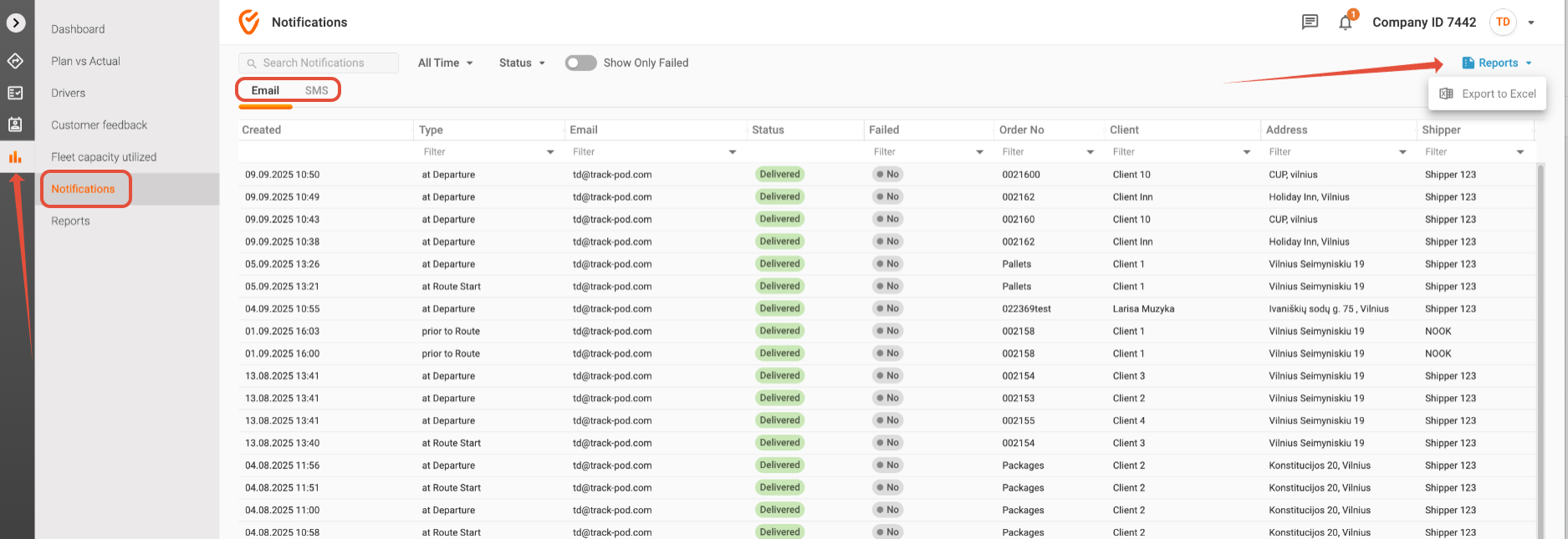
For a clearer understanding of all the notifications dispatched to your customers, please navigate to Analytics -> Notifications. This section provides a comprehensive overview of your notification activities, allowing you to monitor their performance effectively.
Viewing Notification Logs
In the Notifications section, you will find a detailed log of notifications that have been sent. This log includes both successful deliveries and any notifications that encountered errors. By reviewing these logs, you can gain insights into your communication effectiveness and identify any issues that may need addressing.
Searching Entries
To streamline your search for specific notifications, you have the option to search entries by email. This feature is particularly useful if you are looking for notifications sent to a particular customer or group of customers. Simply enter the email address in the search bar, and the system will filter the results accordingly.
Setting Time Ranges
You can also set the time range displayed in the logs. This allows you to focus on notifications sent within a specific period, making it easier to analyze trends or investigate particular campaigns. Adjust the date filters to narrow down your search and view the relevant notifications.
Filtering by Status
To further refine your results, you can filter entries by their status. This means you can quickly view notifications that were successfully delivered, those that failed, or any that are undelivered. This feature helps you identify and resolve issues promptly, ensuring your customers receive timely updates.
Exporting to Excel
For those who prefer to analyze data offline or share it with team members, you can export the full history of notifications to Excel. This functionality allows for deeper analysis and reporting, enabling you to track performance metrics and make informed decisions based on your notification history.
Switching Between Email and SMS
If you are sending notifications via both email and text messages, simply toggle between the tabs labeled Email and SMS. This allows you to view and manage notifications across different channels seamlessly, ensuring that you have a holistic view of your communication efforts.
By utilizing these tools within the Analytics -> Notifications section, you can effectively monitor and manage your notification strategies, enhancing your customer engagement and satisfaction.
Was this article helpful?
That’s Great!
Thank you for your feedback
Sorry! We couldn't be helpful
Thank you for your feedback
Feedback sent
We appreciate your effort and will try to fix the article