Configuring SMS settings in Track-POD is a straightforward process that allows you to keep your customers informed through various types of text messages. These notifications can include advance notifications, live tracking links, estimated time of arrival (ETA) updates, and post-delivery status updates. Here’s how to set it up effectively:
Step 1: Access Settings -> Notifications
Begin by logging into your Track-POD account. Navigate to the Settings -> Notifications section, where you will find options to customize your SMS notifications.
Step 2: Choose the Type of Notifications
Within the Notification Settings, you can select/enable the types of SMS notifications you want to send. Options include:
- Prior to Route: Inform customers ahead of time about upcoming deliveries.
- At Route start: Provide a live tracking link that allows customers to track their deliveries in real-time.
- en Route: Send updates when a driver is leaving a preceding stop and is heading to the customer.
- At Departure: Notify customers once their package has been delivered.
Step 3: Format Phone Numbers
Track-POD is integrated with an international SMS platform, which means all phone numbers must be submitted in the international long-code format. If you have customers' phone numbers in a local format, you can easily convert them.
To do this, go to Settings -> Notifications -> Advanced and select the corresponding country. The system will automatically add the appropriate international phone code to any imported local numbers. For example, if you import a UK phone number like 07438-324 935, the system will convert it to +447438324935 by omitting any leading "0", spaces, or dashes.
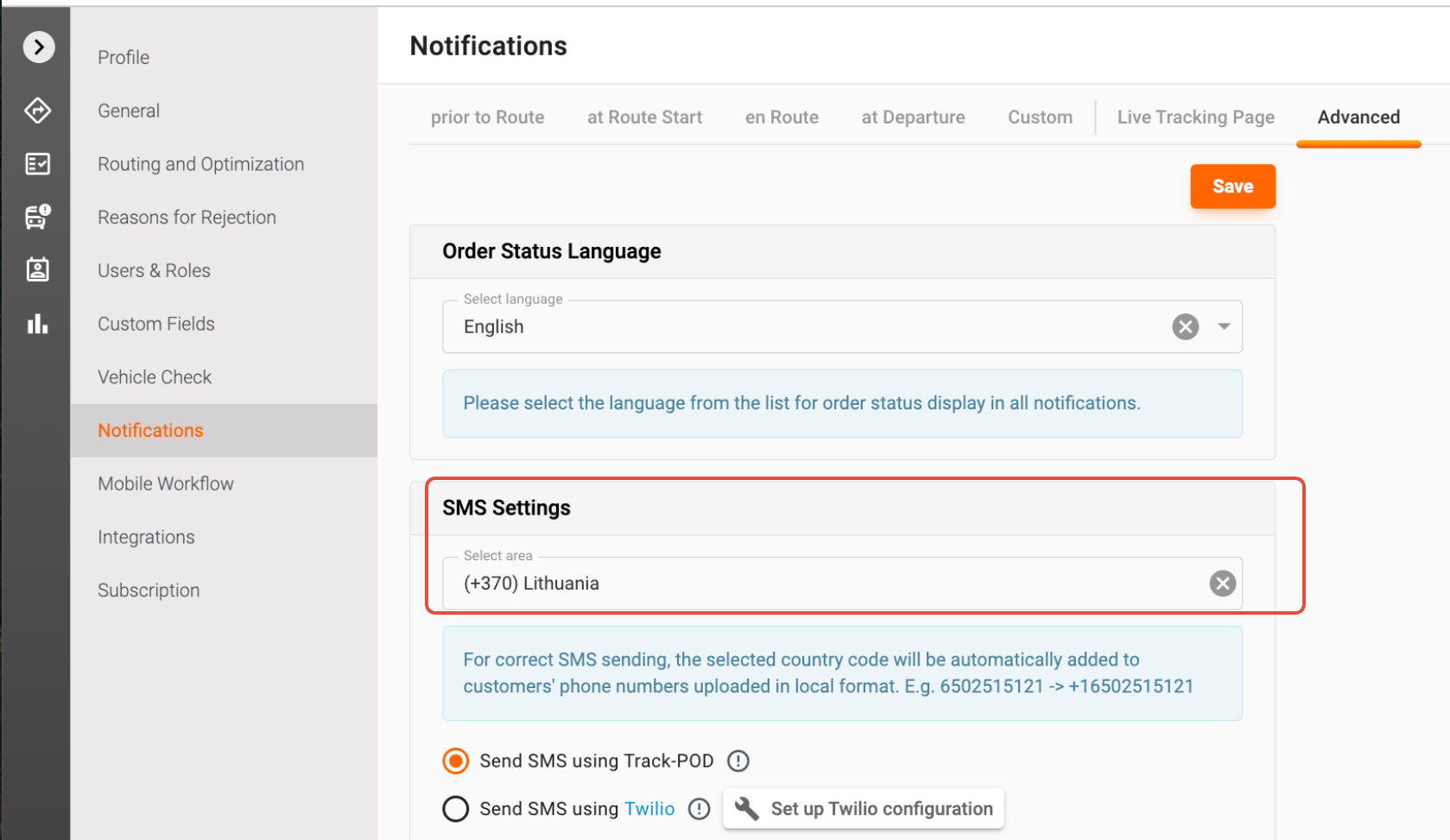
Step 4: Handling Mixed Formats
If you have a mix of phone numbers in both local and international formats, don’t worry! Track-POD will standardize all numbers to ensure they meet the international SMS delivery requirements. This guarantees that all your customers receive their messages without any issues.
By following these steps, you can ensure that your SMS notifications are set up correctly, keeping your customers informed and enhancing their overall experience with your service. If you have any further questions or need assistance, feel free to reach out to our support team!
Was this article helpful?
That’s Great!
Thank you for your feedback
Sorry! We couldn't be helpful
Thank you for your feedback
Feedback sent
We appreciate your effort and will try to fix the article