How to integrate Viva Wallet with Track-POD

Created by Tanya Derevyanko, Modified on Tue, 14 Apr at 12:07 PM by Tanya Derevyanko

Viva integration with Track-POD is simple and does not require API keys or additional configuration.


Prerequisites

  • Active Viva Wallet account

  • Viva Terminal app installed on the driver’s phone

  • Driver is logged into the correct account


Setup Instructions

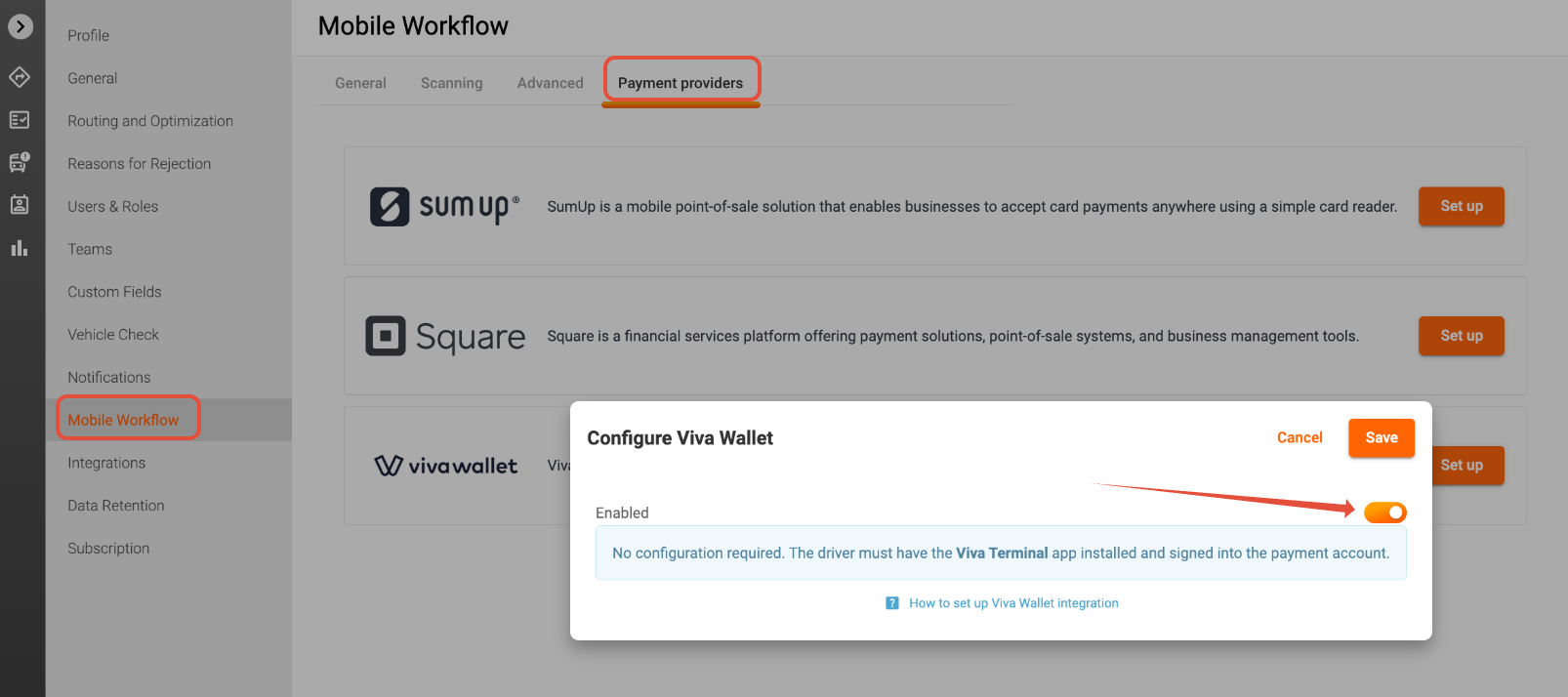
No setup is required in the Track-POD Admin Panel. However, you need to enable the integration by navigating to Settings -> Mobile Workflow -> Payment providers -> clicking Set up in Viva Wallet and switching the toggle on.


Step 1: Configure Driver Device

On the driver’s phone:

  • Install the Viva Terminal app

  • Log in with the merchant account

Ensure the terminal is ready to accept payments


Step 2: Accept Payments

  1. Open the order in the Track-POD app

  2. Select Viva as the payment method

  3. Complete the payment using the Viva Terminal app


Step 3: Test the Setup

  • Perform a test payment

  • Verify the transaction is successfully processed


Notes

  • No API keys or credentials are required

  • Payment processing is handled entirely within Viva Terminal


Additional Recommendations

  • Always perform a test transaction before going live

  • Ensure:

    • Stable internet connection

    • Apps are updated to the latest version

    • Merchant accounts are fully verified


Disclaimer
  • Payments will be directed to the wallet configured in the Viva Wallet app. Track-POD does not validate the wallet and is not liable for the choice of wallet in the app


Was this article helpful?

That’s Great!

Thank you for your feedback

Sorry! We couldn't be helpful

Thank you for your feedback

Let us know how can we improve this article!

Select at least one of the reasons
CAPTCHA verification is required.

Feedback sent

We appreciate your effort and will try to fix the article