This comprehensive guide provides detailed instructions on how to effectively integrate SumUp with the Track-POD mobile application. This integration is designed to empower drivers by enabling them to seamlessly accept payments through the SumUp app. The guide will cover all necessary steps and considerations to ensure a smooth setup and operation for users.
Prerequisites
Before you begin, make sure:
You have a SumUp merchant account
The SumUp app is installed on the driver’s phone
The driver is logged into the correct SumUp account
Step 1: Create an Affiliate Key in SumUp
Go to the SumUp Developer Portal
Navigate to Affiliate Keys
Click Create Affiliate Key
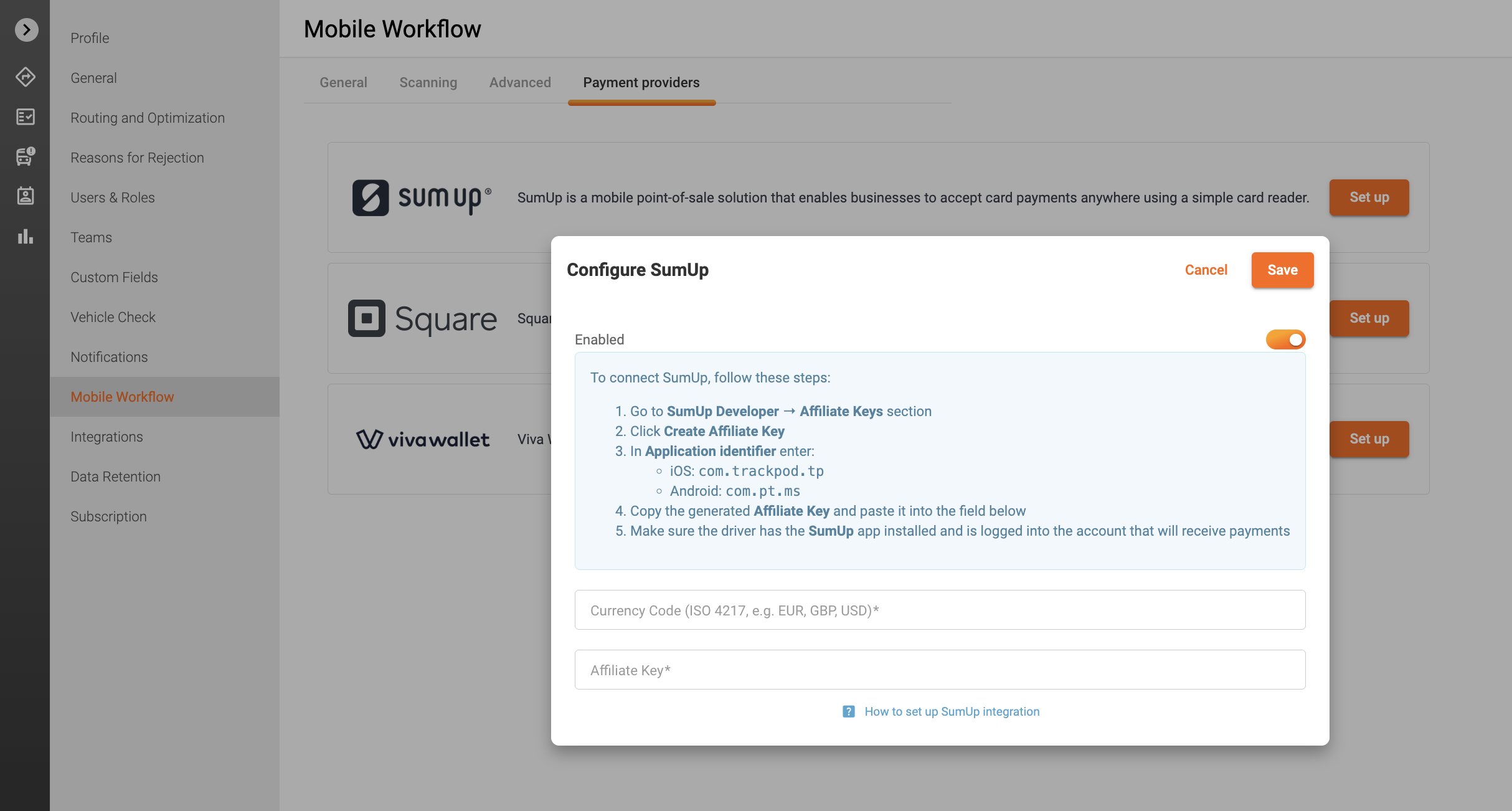
Enter the following Application Identifiers:
iOS Application Identifier:
com.trackpod.tpAndroid Application Identifier:
com.pt.ms
Generate and copy your Affiliate Key
Step 2: Add Affiliate Key to Track-POD
Open your Track-POD Settings
Go to Settings -> Mobile Workflow -> Payment Provider
Click Set up and switch on the toggle Enabled.
In the open window paste the Affiliate Key
Enter Currency Code
Save changes
Step 3: Configure Driver Device
On the driver’s phone:
Install the SumUp app
Log in with the account that will receive payments
Ensure the SumUp device is connected and ready
Step 4: Test the Integration
Create a test delivery/order
Initiate payment from the Track-POD app
Confirm that the SumUp app opens and processes the payment
Notes
The payment is processed entirely via the SumUp app
Track-POD only triggers the payment flow
Was this article helpful?
That’s Great!
Thank you for your feedback
Sorry! We couldn't be helpful
Thank you for your feedback
Feedback sent
We appreciate your effort and will try to fix the article