When you create a new Shipper in our system, it's important to understand that they will not have access to any Depots initially. This is a standard procedure to ensure that each Shipper is properly associated with their designated Depot(s) before they can start using our services. Here’s how you can add a Depot for a new Shipper and ensure they have the necessary access.
Step-by-Step Process to Associate a Shipper with a Depot
1. Create the First Order: The first step in linking a new Shipper to a Depot is to create an order that includes the Shipper and their designated Depot in the order details. This order acts as a bridge, establishing the connection between the Shipper and the Depot.
2. Order Details: While creating the order, make sure to fill in all relevant details, including the Shipper's information and the specific Depot they will be associated with. This ensures clarity and accuracy in the linkage process.
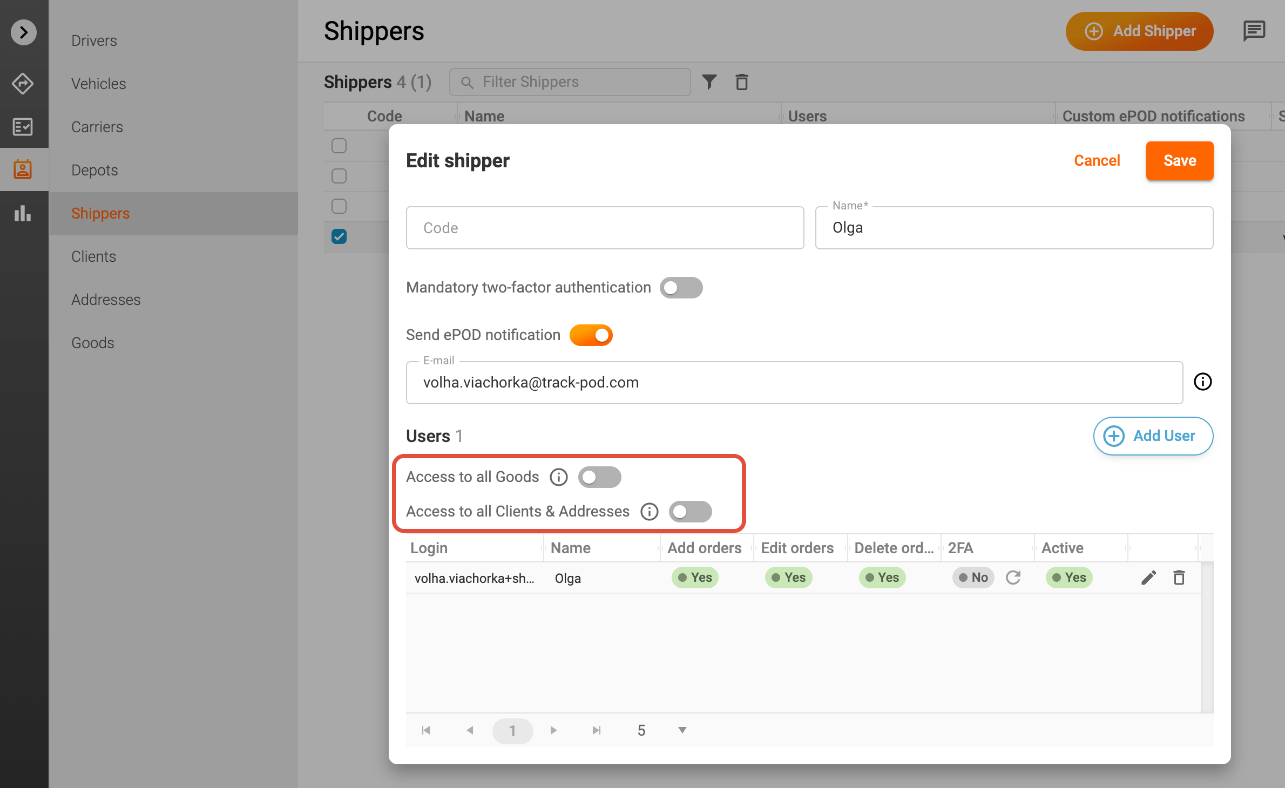
3. Access to Existing Directories: In addition to associating the Shipper with a Depot, you have the option to grant them access to existing Directories in full or to limit their access to Addresses, Clients, Goods related to them only. This includes:
- Access to all Clients: Allowing the Shipper to access all client entries from your Directories.
- Access to all Addresses: Providing access to all address details for efficient shipping and logistics management.
- Access to all Goods: Enabling the Shipper to add any goods listed in your Directories to the orders they will be handling.
By following these steps, you can effectively add a Depot for a new Shipper, ensuring they have the necessary access to perform their duties efficiently. If you encounter any issues during this process or have further questions, please don’t hesitate to reach out to our customer support team for assistance. We’re here to help!
Was this article helpful?
That’s Great!
Thank you for your feedback
Sorry! We couldn't be helpful
Thank you for your feedback
Feedback sent
We appreciate your effort and will try to fix the article